
What Is a Forex Tick Volume Indicator?
A forex tick volume indicator counts how many times price updates during a selected period. The displayed count depends on what the feed records as a quote event, and platforms may filter or aggregate updates differently.
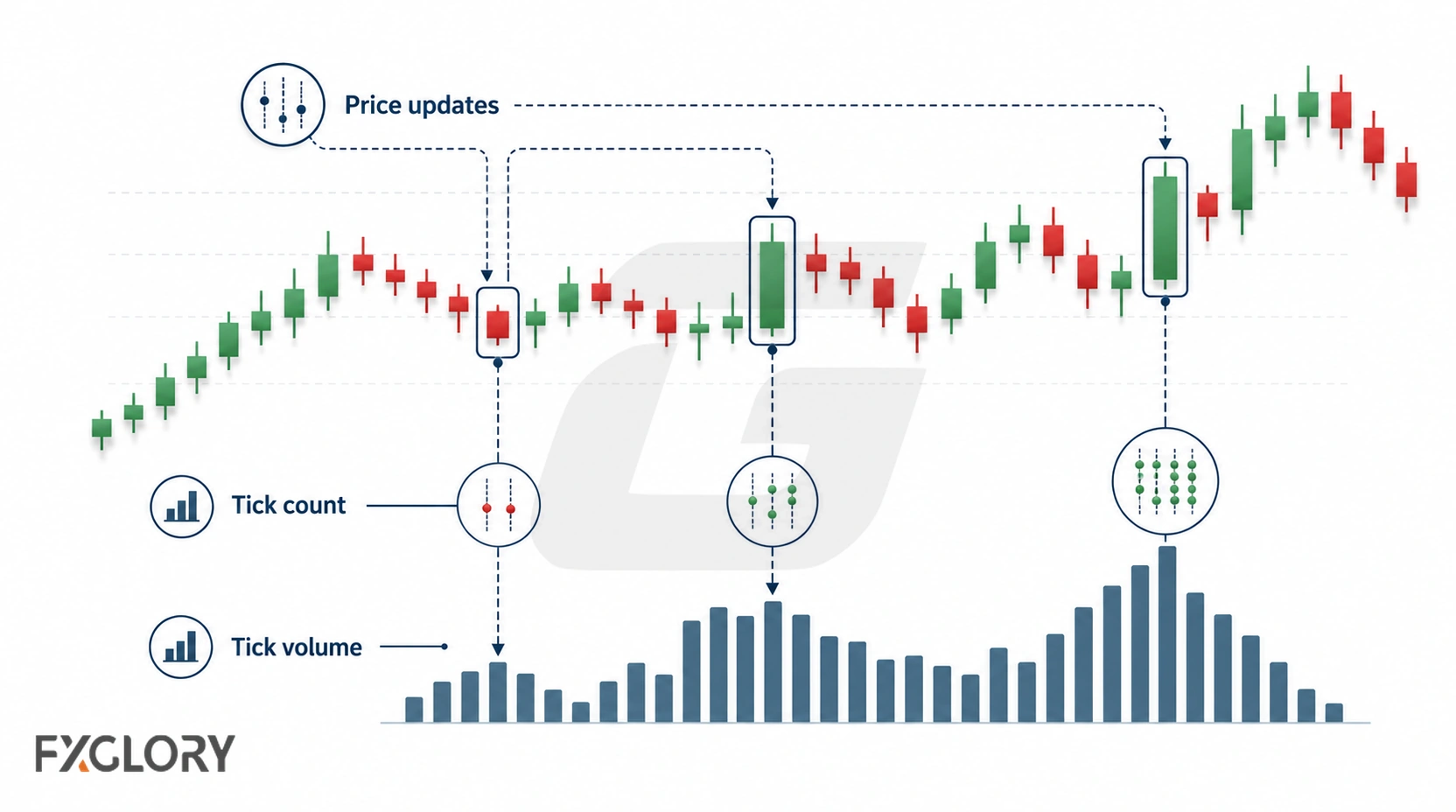
Tick volume does not count total money traded. It does not count total global forex volume, total lots, true order flow, or complete interbank activity. It is an activity proxy based on available price updates from a broker or platform feed.
This matters because spot forex is decentralized. There is no single exchange tape that shows complete traded volume for every spot forex transaction. Tick volume can still help review activity intensity, but it must be read with data-source awareness.
For chart context around tick-volume changes, review market structure context.
How Tick Volume Works in Forex
Tick volume builds a count of price updates inside a selected candle or period. A higher tick-volume bar means price updated more often during that period. A lower tick-volume bar means price updated less often.
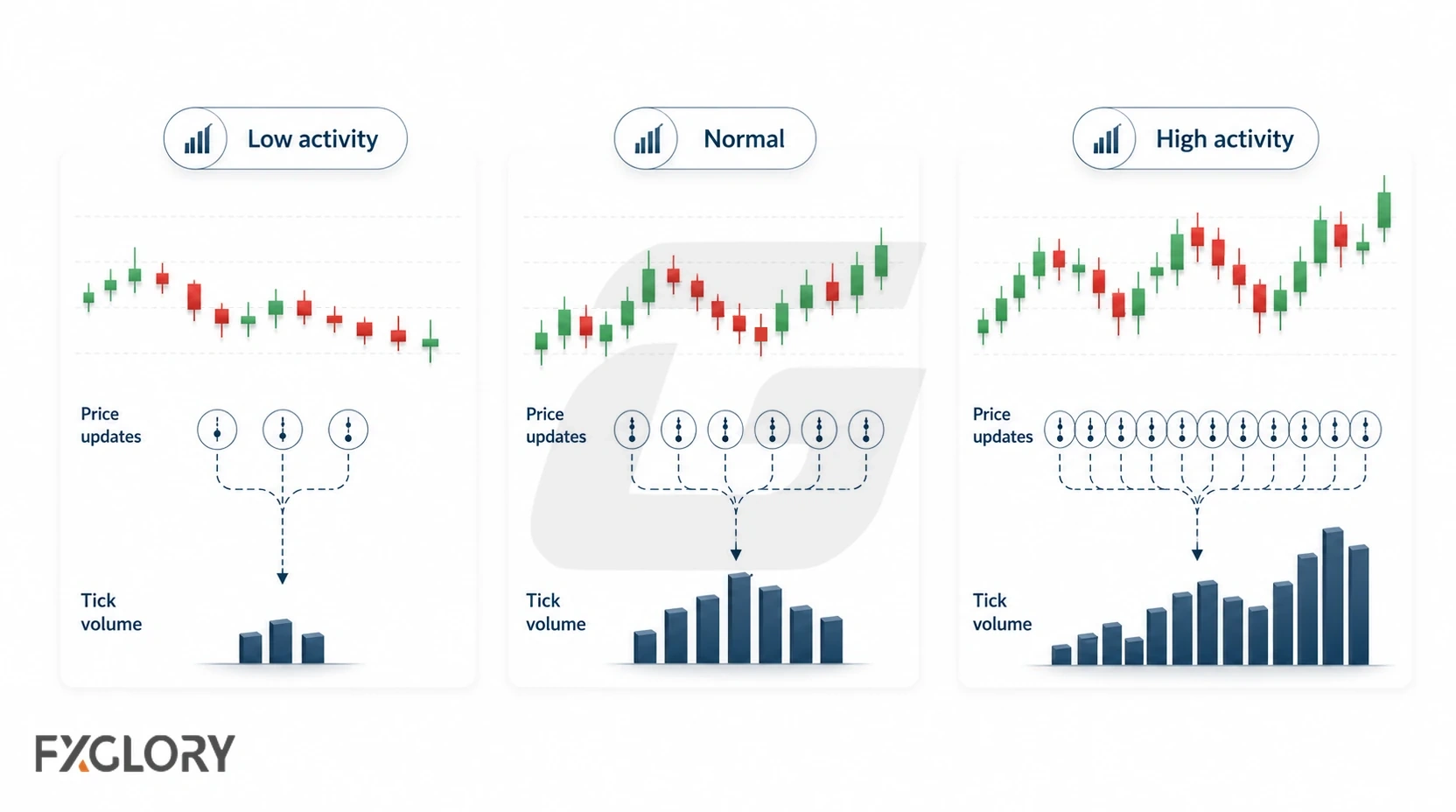
This does not automatically mean more money was traded. A fast quote stream, a news event, thin liquidity, spread changes, or volatile pricing can all increase tick counts without proving actual traded participation or direction.
- Higher tick volume: Price updated more often during the selected period.
- Lower tick volume: Price updated less often during the selected period.
- Flat tick activity: Market activity may be quiet, range-bound, or feed-limited.
- Tick-volume spike: Activity changed sharply, but direction is not confirmed.
- Repeated noisy bars: Session conditions, volatility, or feed behavior may be unstable.
Tick Volume vs Real Volume
The main mistake is treating tick volume as if it were real exchange volume. Real volume counts traded units, shares, contracts, or lots in a centralized market. Tick volume counts recorded quote updates from an available forex feed.
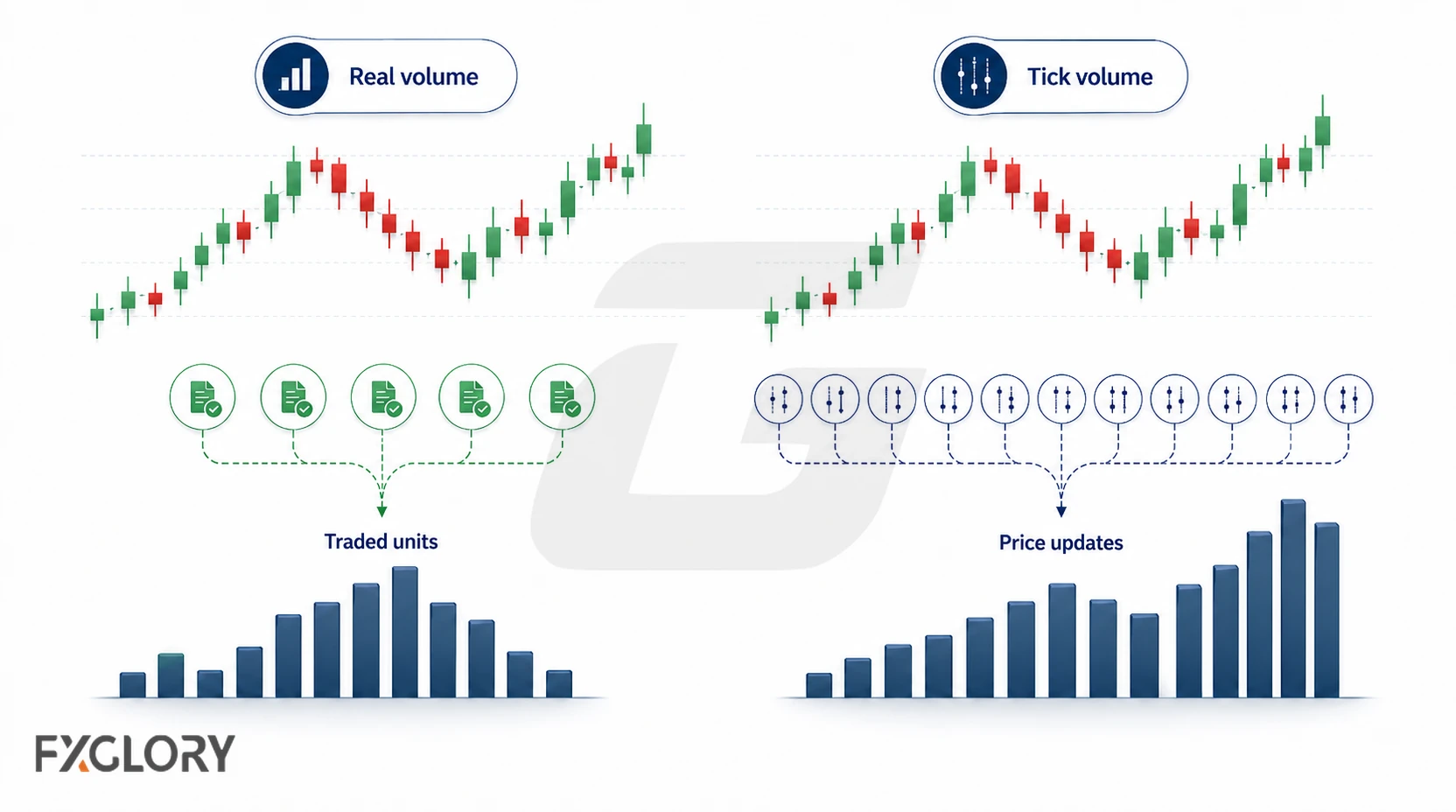
Both can describe activity, but they are not the same data type.
| Data type | What it measures | Where it is common | Main limitation |
|---|---|---|---|
| Real exchange volume | Units, contracts, shares, or lots traded | Stocks and exchange-traded futures | Does not represent total spot forex volume |
| Tick volume | Number of price updates | Retail spot forex platforms | Does not show total money traded |
| Broker volume | Activity visible to one broker or platform | Retail trading environments | Does not show the full global market |
| Futures volume | Exchange-traded futures activity | Currency futures markets | Related but not identical to spot forex |
| Market depth | Visible orders or liquidity on a feed | Some platforms and venues | Does not show all hidden or global liquidity |
Why Tick Volume Can Differ Between Brokers
Tick-volume readings can differ because brokers and platforms may not receive, aggregate, or display quotes in the same way. Two platforms can show different tick counts for the same pair and timeframe.
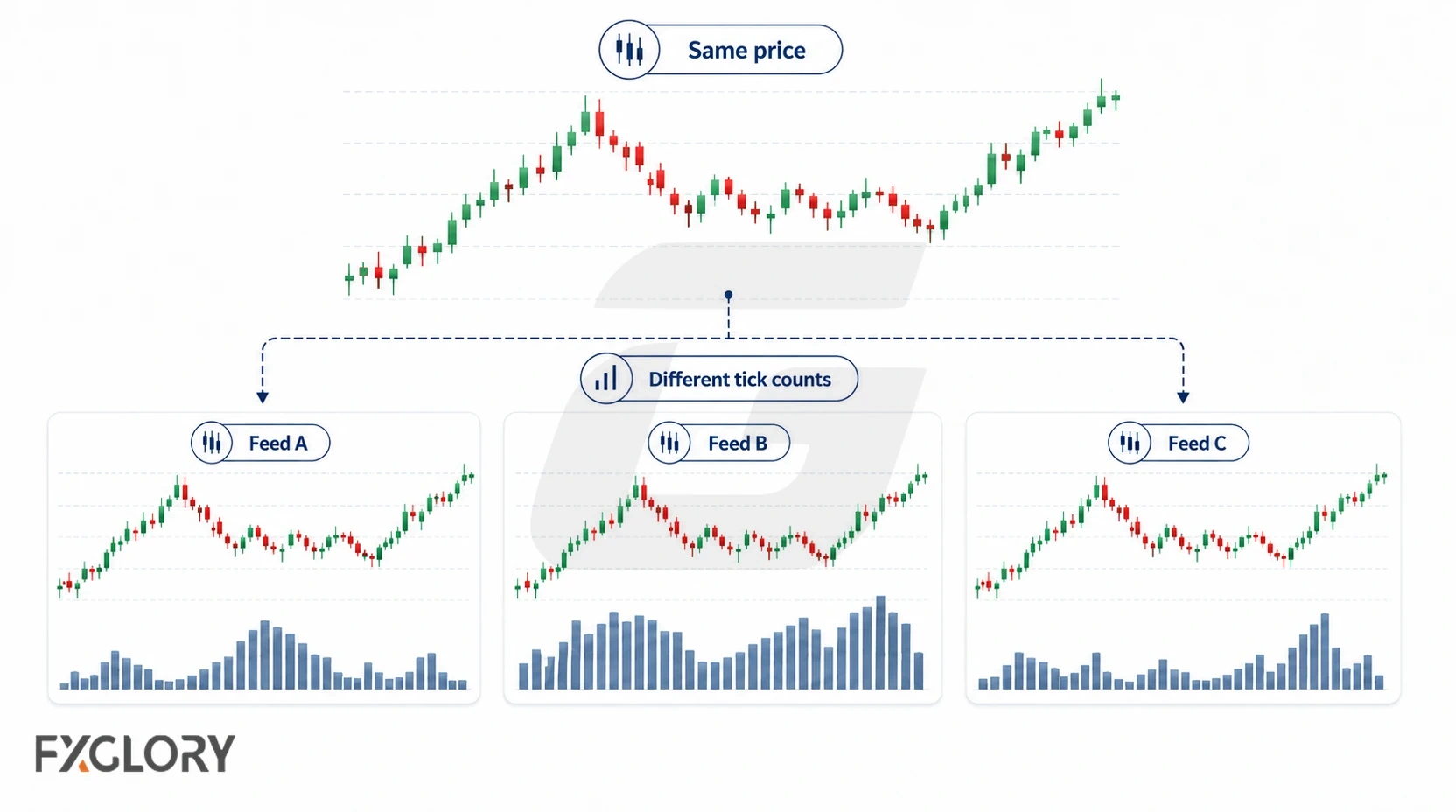
This does not automatically make one feed useless. It means tick volume should be compared within the same data environment instead of being treated as one universal market number.
- Liquidity providers: Different providers can create different quote streams.
- Quote frequency: One feed may update more often than another.
- Server setup: Broker server settings can affect how data is recorded.
- Platform aggregation: Platforms can group or display ticks differently.
- Session handling: Rollover, server time, and weekend handling can affect bar data.
Why Forex Uses Tick Volume
Spot forex trades through a decentralized network rather than one central exchange. Because of that, retail platforms usually do not show complete centralized market-wide volume for spot forex pairs.
Tick volume fills part of that gap by showing price-update activity. It can help review whether activity increased, decreased, spiked, or stayed quiet relative to recent conditions.
| Tick-volume use | What it can help review | What it does not prove |
|---|---|---|
| Activity intensity | Whether price updated more or less often | Total traded money |
| Quiet conditions | Periods with fewer price updates | Safe or predictable conditions |
| Activity spikes | Sudden change in quote-update frequency | Clean direction or breakout success |
| Price-volume context | Whether activity changed around a price move | Institutional participation |
| Session comparison | How activity compares within a session | Universal global market volume |
Tick Volume Needs a Baseline
A single tick-volume bar is weak by itself. It becomes more useful when compared with recent bars, a volume average, the same session, and price behavior on the same chart.
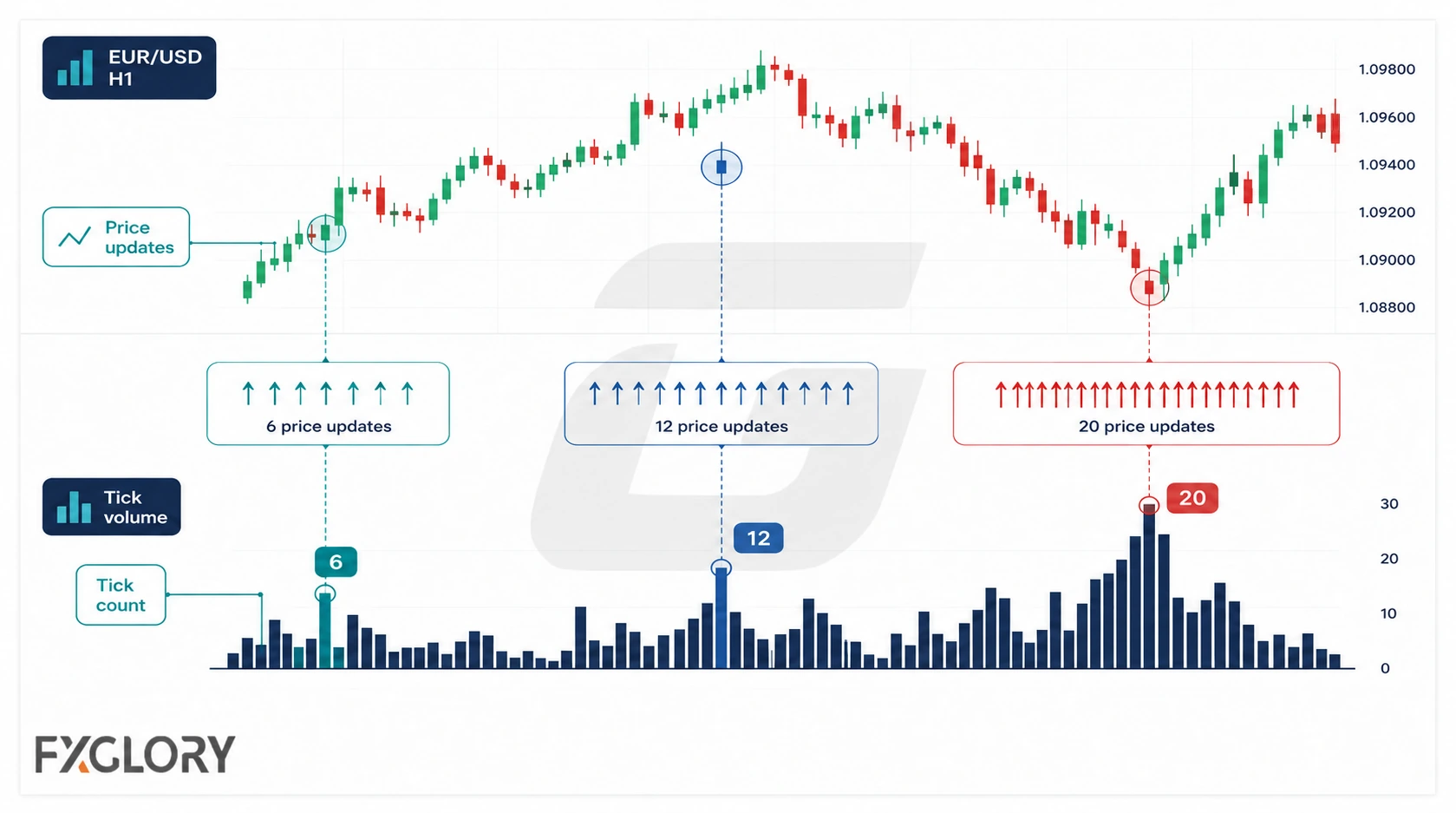
For example, compare 15-minute bars around the London–New York overlap with equivalent time windows on other days, rather than treating an overnight 15-minute bar as an identical baseline. Keep the instrument, feed, timeframe, and bar boundaries consistent.
- Recent-bar comparison: Compare the current bar with nearby bars on the same chart.
- Volume average: Compare tick volume with a recent activity average.
- Same-session comparison: Compare London with London, New York with New York, and quiet sessions with quiet sessions.
- Same-feed comparison: Avoid treating different broker feeds as identical.
- Price-behavior comparison: Read the activity bar beside candle structure and follow-through.
Tick Volume Spikes: Activity Change, Not Direction
A tick-volume spike means the price updated more often during that period. It does not automatically show buying pressure, selling pressure, breakout confirmation, reversal confirmation, or true order flow.
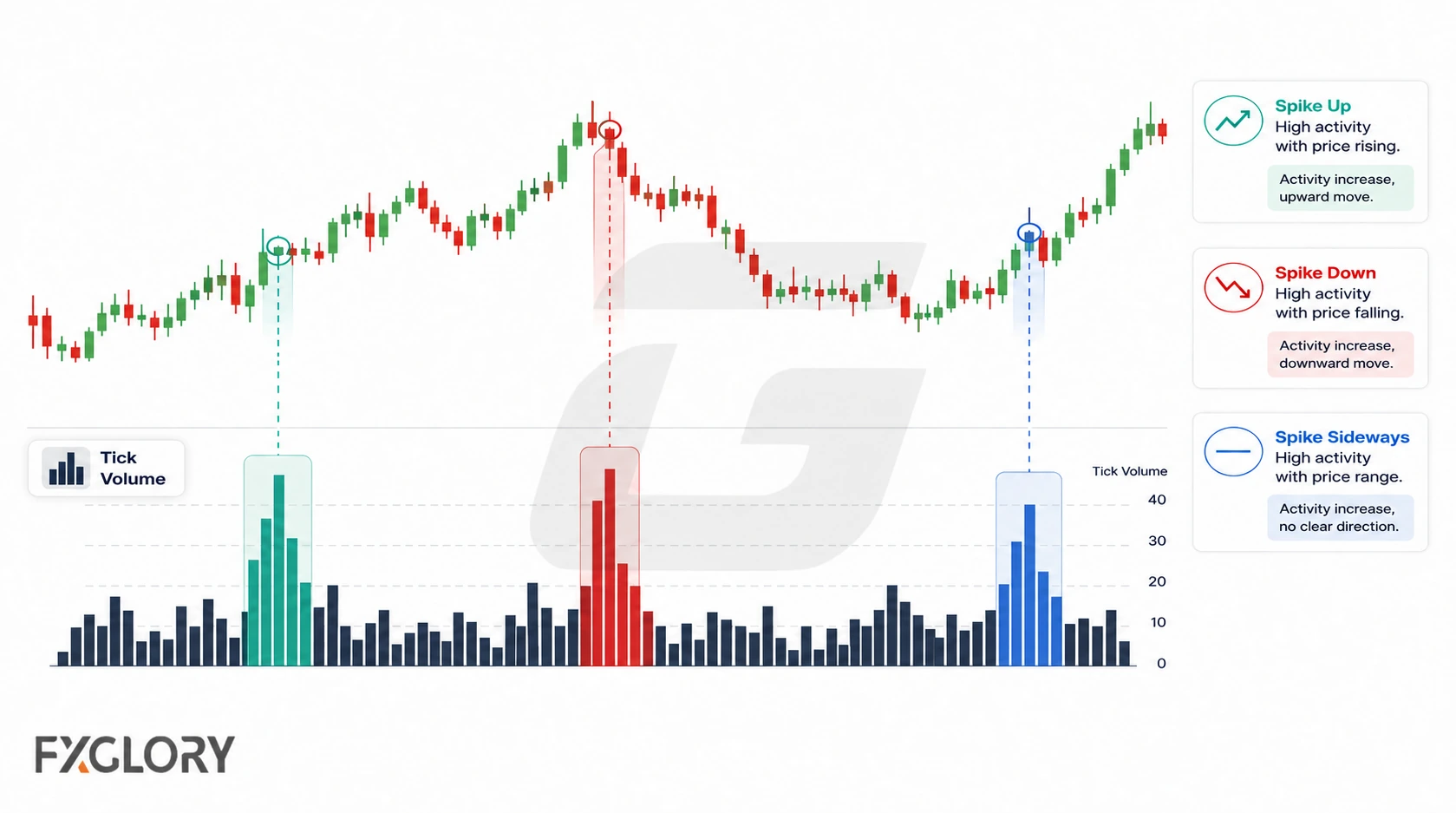
Spikes can appear during normal session activity, but they can also appear during unstable conditions.
- News spike: Price updates can increase sharply around data releases or central-bank events.
- Session open: Activity can jump when a major session begins.
- Session overlap: Quote updates may arrive faster as the market becomes more active.
- Rollover: Thin liquidity and spread changes can distort readings.
- Holiday market: Lower participation can make price updates unstable.
- Spread widening: Tick counts can rise while pricing conditions worsen.
- Volatility burst: Fast movement can produce many updates without clean structure.
Breakout and Reversal Misuse
Tick volume is often misused as breakout or reversal confirmation. A higher tick-volume bar can support a review question, but it cannot confirm the result by itself.
A breakout still needs structure, follow-through, retest behavior, spread context, and invalidation. A reversal still needs price reaction, failed continuation, structure change, and risk control.
| Tick-volume situation | What it may suggest | What it does not confirm |
|---|---|---|
| High tick volume on breakout candle | Activity increased during the break attempt | Breakout success |
| Low tick volume on breakout candle | Activity may be limited or feed activity may be quiet | Automatic failed breakout |
| Tick-volume spike after a trend | Activity changed sharply | Immediate reversal |
| Tick volume rises with price | Price updated more often during upward movement | Continuation higher |
| Tick volume rises while price rejects | Activity increased around rejection | Clean reversal without structure |
| Tick volume falls in a range | Activity may be cooling | Safe range trading conditions |
Tick Volume vs OBV, MFI, VWAP, and A/D
For a broader overview, see forex volume indicators. Tick counts are an input, while tools such as OBV and MFI transform price and available volume into different calculations.
| Tool | How tick volume relates | Keep separate because |
|---|---|---|
| Tick volume histogram | Shows price-update activity directly | Does not transform activity into pressure, oscillator, or price reference |
| OBV | May use tick volume as input | OBV is a cumulative close-direction pressure line |
| MFI | May use tick volume as input | MFI is a 0–100 price-volume oscillator |
| VWAP | May use tick volume as input | VWAP is a volume-weighted price reference |
| A/D Line | May use tick volume as input | A/D uses close location inside the candle range |
| Volume Profile | May use available activity data | Volume Profile organizes activity by price area, not time-period bars |
How to Use Tick Volume with Price Confirmation
Read tick volume as a relative activity measurement, not a direction signal. Start with a consistent feed and baseline, then check what price actually does around the relevant level.
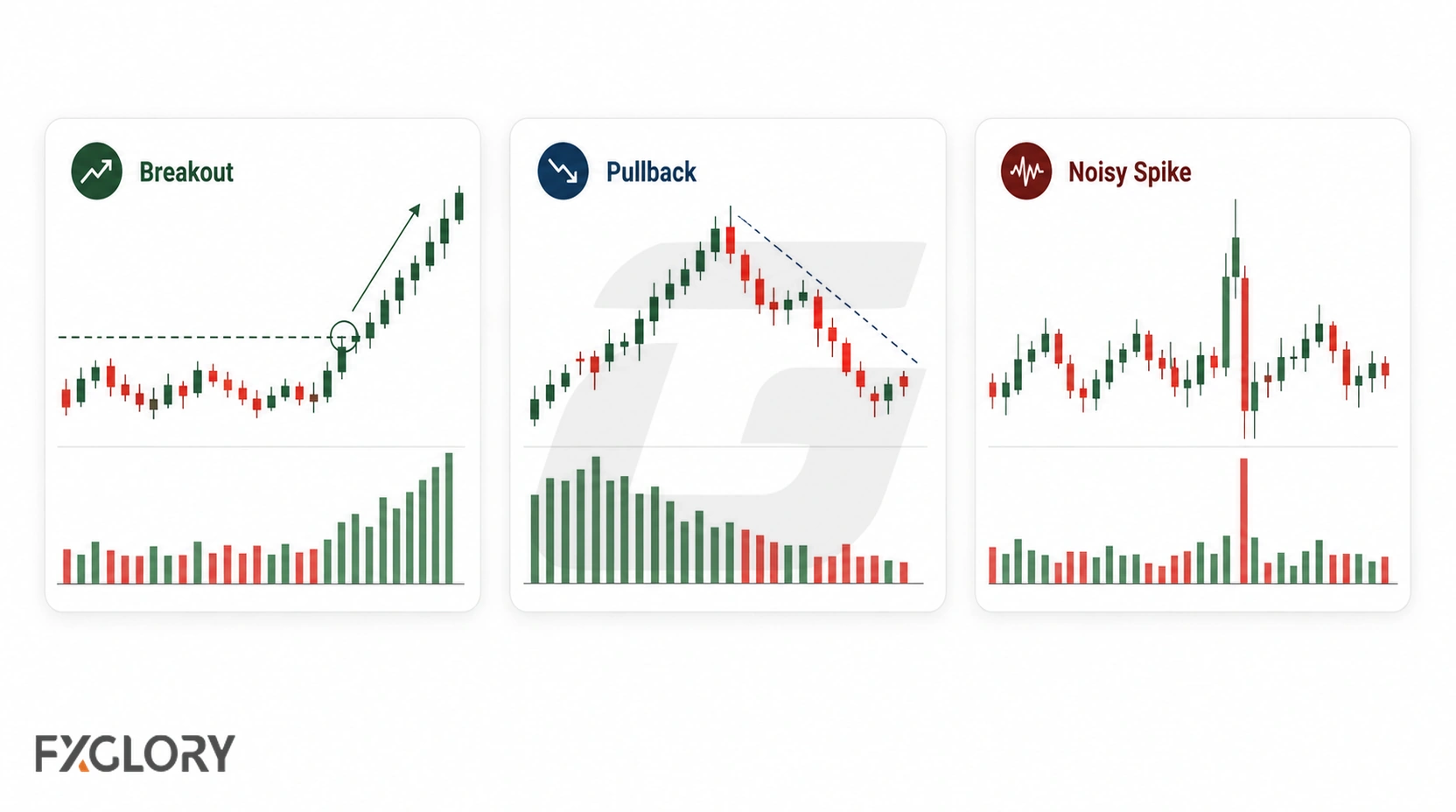
- Verify the feed: Identify the instrument, broker or platform, timeframe, and whether the bars show tick rather than executed volume.
- Establish a baseline: Compare similar time-of-day or session bars on the same feed; note whether activity is ordinary or exceptional.
- Locate the price event: Mark the nearby support, resistance, range edge, or structure break before interpreting the activity.
- Check follow-through: Review the price reaction after the high- or low-activity bar instead of assuming the bar predicts direction.
- Check trading conditions: Consider news, spread changes, rollover, volatility, and thin liquidity.
- Define invalidation: Specify what price behavior would disprove the proposed setup and determine risk before trading.
For context on price responses, see market structure and support and resistance.
Tick Volume Chart Scenarios
These are illustrative interpretations, not observed live readings or proven trading setups.
| Scenario | What the activity shows | What to verify |
|---|---|---|
| Range breakout attempt | A bar has substantially more ticks than comparable same-session bars | Price closes beyond the range, holds or retests the level, and spreads remain reasonable |
| Volatility around news | Quote updates jump sharply | Whether wider spreads, fast revisions, or slippage make the bar misleading |
| Quiet overnight range | Update counts are lower than during active sessions | Compare against similar overnight windows, not London–New York overlap bars |
Custom Tick Volume Indicator Caution
Some traders use custom tick-volume indicators with colored bars, session midpoint lines, high/average/low labels, alerts, dashboards, or volume-price-analysis overlays. These can make scanning easier, but the logic should be understandable before it is used.
A custom tick-volume tool can look clean in old examples and still fail when feed quality, session behavior, spread, volatility, or quote frequency changes.
- Calculation check: Does the tool count standard price updates, or does it use modified logic?
- Feed check: Does it depend on one broker, one platform, or one liquidity feed?
- Color check: Are bar colors based only on candle direction, or do they imply buyer/seller volume?
- Baseline check: Is high, average, or low activity based on a clear session or moving average?
- Alert-timing check: Does the alert appear after candle close, or can it change while the candle is forming?
- Repaint check: Does the tool change past readings after new data appears?
- Overfitting check: Are thresholds chosen only because old examples look clean?
Forex Tick Volume False-Signal Filters
Use these filters when tick volume looks important but the chart condition does not support the reading.
| Filter | Problem it catches | What to check |
|---|---|---|
| Real-volume confusion filter | Tick volume treated as total traded money | Data type and source |
| Broker-feed mismatch filter | Different broker feeds compared as if identical | Same platform, same feed, and same aggregation |
| News-spike filter | Quote bursts during event risk treated as clean activity | Calendar, headlines, volatility, and spread |
| Session-liquidity filter | Rollover, holidays, or thin sessions distort readings | Session timing and liquidity condition |
| Spread-widening filter | Ticks increase while pricing conditions worsen | Spread behavior and execution context |
| Baseline-error filter | One volume bar read without comparison | Recent bars, same session, and activity average |
| Breakout-overread filter | High tick volume treated as breakout proof | Structure, follow-through, retest, and invalidation |
| Reversal-overread filter | Tick spike treated as reversal proof | Price reaction, failed continuation, and structure change |
| Buyer-seller-overread filter | Candle color treated as real buyer/seller volume | Indicator calculation and feed logic |
| No-invalidation filter | No clear place where the idea is wrong | Risk distance and invalidation rule |
How to Test Tick Volume in Forex
To evaluate whether tick volume adds useful information, define the comparison and outcome before inspecting results. A historical test of a proposed setup is not evidence of live broker execution performance.
- Specify the question: For example, whether an unusual tick-volume bar improves identification of a defined breakout attempt.
- Fix the dataset: Record instrument, broker/platform, feed, chart timeframe, historical dates, session time zone, and missing-data handling.
- Specify the baseline: Define the same-feed comparison window, including whether bars are matched by session or time of day. Keep the rule unchanged through the test.
- Set observable rules: Define the activity threshold, qualifying price structure, entry or observation timing, follow-through window, and invalidation without looking ahead.
- Separate market conditions: Record trend or range, session, scheduled news, volatility, spreads, and any relevant execution-cost assumptions.
- Record all candidates: Include unsuccessful and ambiguous observations, not only attractive chart examples. Track the sample size and failure reasons.
- Validate separately: Test the preselected rules on later or otherwise unseen observations, without tuning thresholds to the validation sample.
Compare outcomes with and without the tick-volume condition to see whether it adds information beyond price structure alone. Differences across feeds and hypothetical cost assumptions limit generalization.