
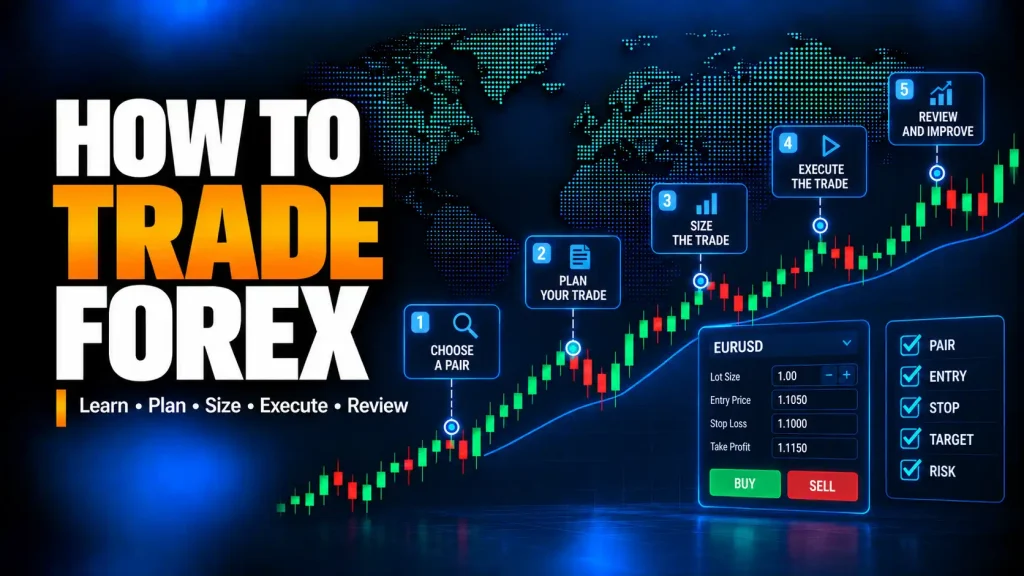
How to Trade Forex: The Process in Brief
Placing an order is only the mechanical part of forex trading. A beginner also needs to understand the platform, trading costs, margin, leverage, and the risk created by position size. Demo practice can help connect those concepts to the order process without putting real money at risk.
What Does It Mean to Trade Forex?
A forex trade expresses a view on the relative value of two currencies. Buying EUR/USD means taking a position that benefits if the euro strengthens against the U.S. dollar, while selling EUR/USD means taking the opposite direction. The quoted pair therefore determines both what is being bought and what is being sold.
How to Start Forex Trading for Beginners: What Do You Need?
To start forex trading as a beginner, focus first on learning the process rather than rushing to a live trade. You do not need to know every forex strategy before learning the trade process, but you do need enough structure to avoid random trades.
If terms such as pips, spreads, lots, margin, or leverage are still unfamiliar, review those basics before placing an order. This guide concentrates on how those concepts come together when planning, sizing, placing, and reviewing a trade.
- Basic forex education: Understand pairs, quotes, pips, spread, lots, margin, and leverage.
- Trading plan: Define setups, entries, exits, risk limits, and review rules.
- Demo account or practice environment: Learn the platform and order process before risking real money.
- Risk rules: Decide maximum planned loss before opening a trade.
- Risk capital: Use money that is not needed for essential expenses and that the trader can afford to lose.
- Account and platform understanding: Review spreads, trade size, margin rules, leverage, account terms, and platform behavior.
- Review habit: Learn from trades instead of repeating the same mistakes.
A live account should only be considered after understanding account terms, platform rules, risk disclosures, costs, margin requirements, and trade-size limits.
Forex Trading Step by Step: From Trade Idea to Review
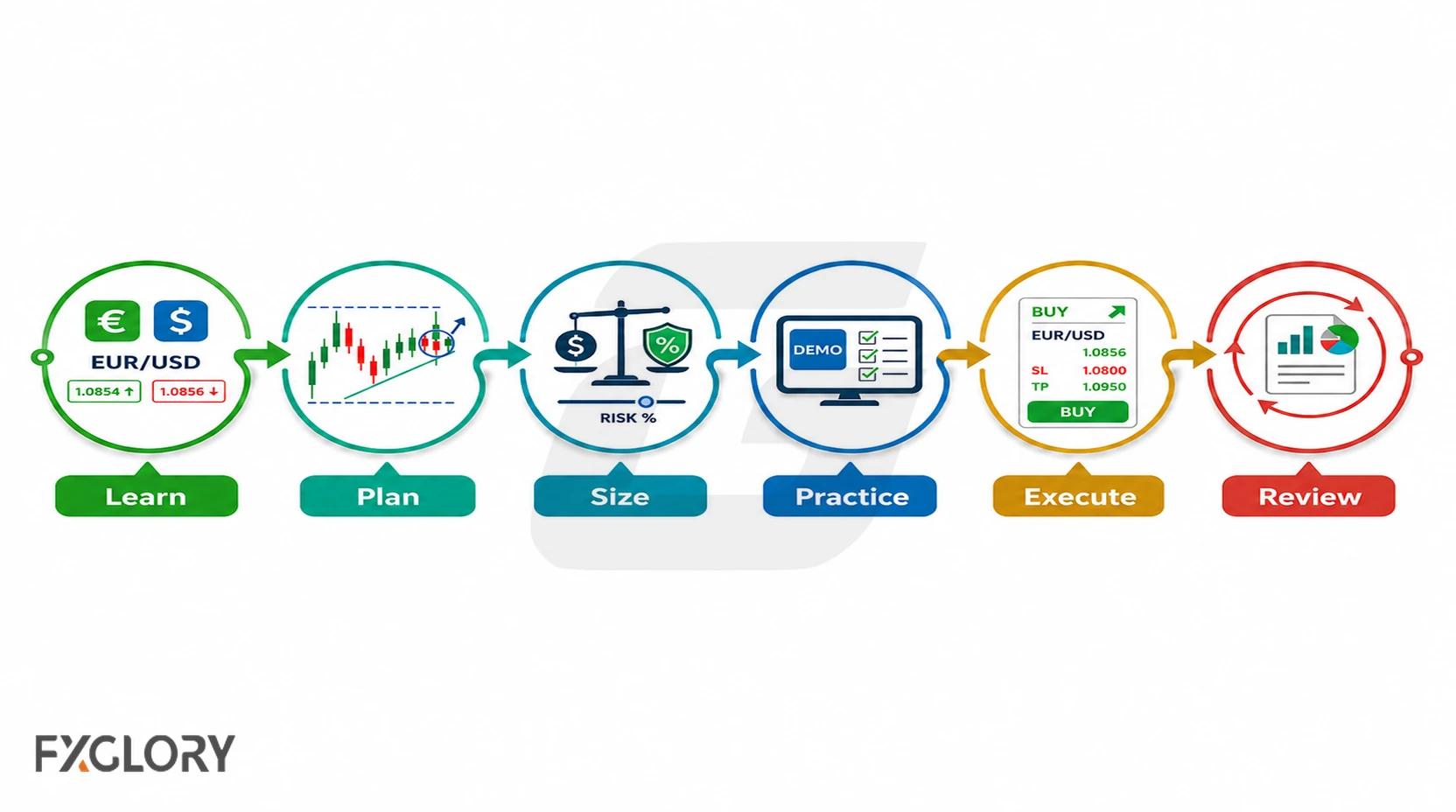
The process below separates preparation from execution so that a trade is not reduced to simply clicking buy or sell. Each stage has a clear purpose and a reason to stop if essential information is missing.
| Stage | Action | Stop If... |
|---|---|---|
| Learn | Read the pair, quote, pip, and spread. | You cannot explain base and quote currency. |
| Plan | Write the trade idea, entry, stop loss, and target. | There is no invalidation level. |
| Size | Calculate lot size, pip value, stop distance, and planned loss. | The possible loss exceeds the plan. |
| Practice | Use demo to practice the trade ticket and order process. | The ticket fields are unclear. |
| Execute | Confirm price, spread, order type, stop loss, take profit, and submit only if rules fit. | Spread, margin, or risk is unclear. |
| Review | Record the result and one improvement point. | No lesson is recorded. |
Step 1: Choose a Forex Pair, Read the Quote and Decide Direction
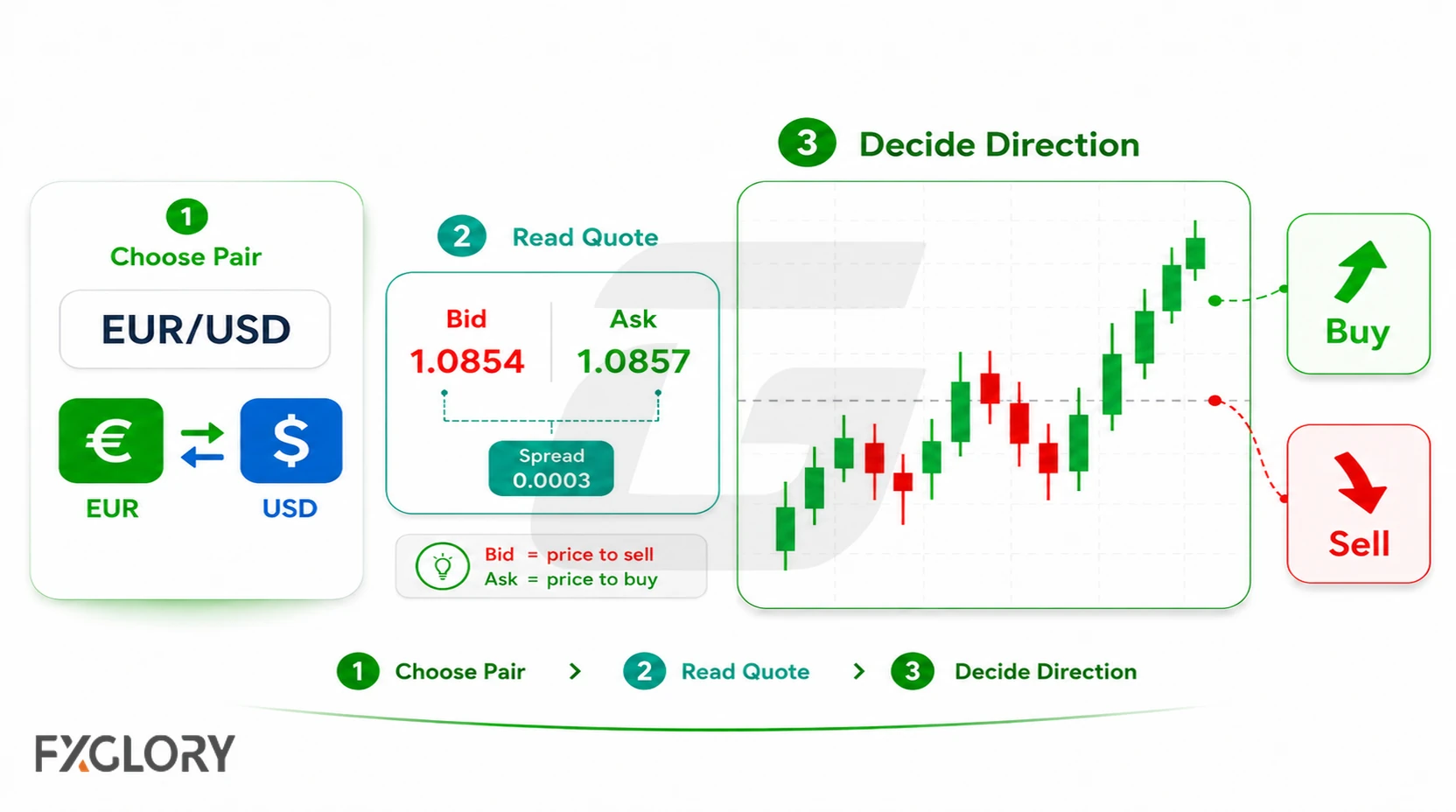
To trade in the forex market, the beginner first chooses a currency pair and decides whether the base currency may strengthen or weaken. In a forex pair, the first currency is the base currency and the second currency is the quote currency.
Read the pair
For example, in EUR/USD, EUR is the base currency and USD is the quote currency. If EUR/USD is 1.1000, the quote means 1 euro costs 1.1000 US dollars.
Choose a pair to watch
Beginners often start with one or two widely followed pairs so they can practice quote reading, spread checks, and trade planning without watching too many markets. When choosing a pair to watch, compare spread, volatility, trading session, and news sensitivity.
EUR/USD is often used in beginner examples because it is widely followed and easy to connect with quote-reading lessons. This does not mean EUR/USD is risk-free or suitable for every trader.
Choose direction
| Expectation | Action | Meaning | EUR/USD Example |
|---|---|---|---|
| Base currency may strengthen | Buy the pair | Buy base currency, sell quote currency. | Buy EUR/USD if expecting EUR to strengthen against USD. |
| Base currency may weaken | Sell the pair | Sell base currency, buy quote currency. | Sell EUR/USD if expecting EUR to weaken against USD. |
Buying a pair is often called going long. Selling a pair is often called going short. Buying usually uses the ask price, while selling usually uses the bid price.
For deeper explanations, see reading forex quotes and bid and ask price in forex.
Step 2: Build a Trade Plan and Analyze the Market
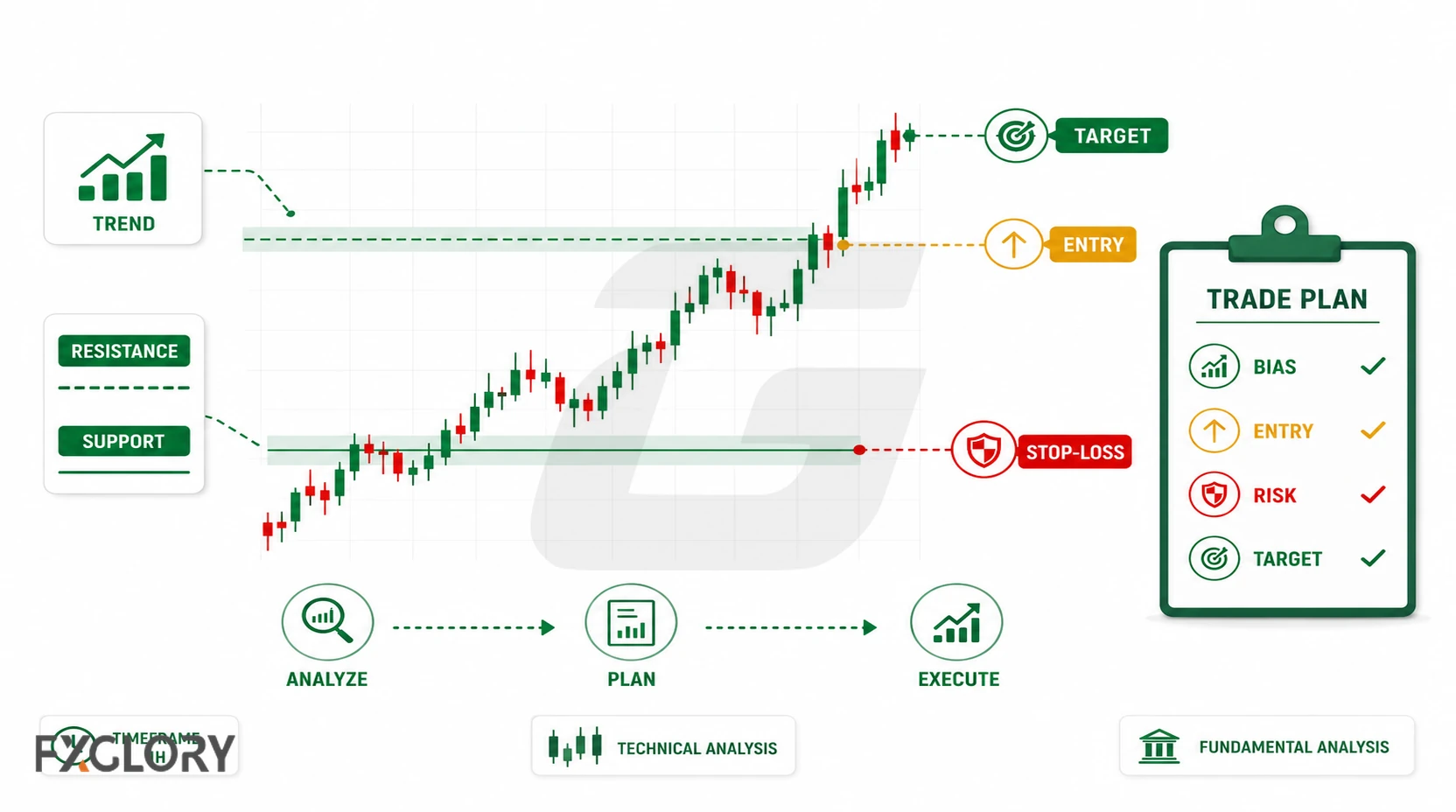
A trading plan defines when to trade, when not to trade, how much to risk, and when to exit. Market analysis gives the trade idea. The plan turns that idea into rules.
A beginner trade idea should answer:
- What timeframe am I using? The trade should be planned on a clear chart timeframe.
- What is the setup? Trend, range, support, resistance, news event, or another condition?
- What level matters? Which price area supports the trade idea?
- What invalidates the idea? Where would the trade be considered wrong?
- Is major economic news scheduled? News can increase volatility, spread, and slippage.
- Does the risk fit? Does the stop distance and lot size match the risk plan?
Beginners usually hear about two broad types of analysis. Technical analysis looks at charts, trends, support, resistance, candles, or indicators. Fundamental analysis looks at economic news, interest rates, inflation, employment data, central banks, or broader market conditions.
For a structured planning page, see the forex trading plan template.
Step 3: Fill the Trade Ticket and Place the Forex Order
A trade ticket is the order window used to turn a planned trade into an order. Before submission, it should be checked for the correct pair, direction, order type, position size, stop loss, take profit, price, spread, and any relevant margin information.
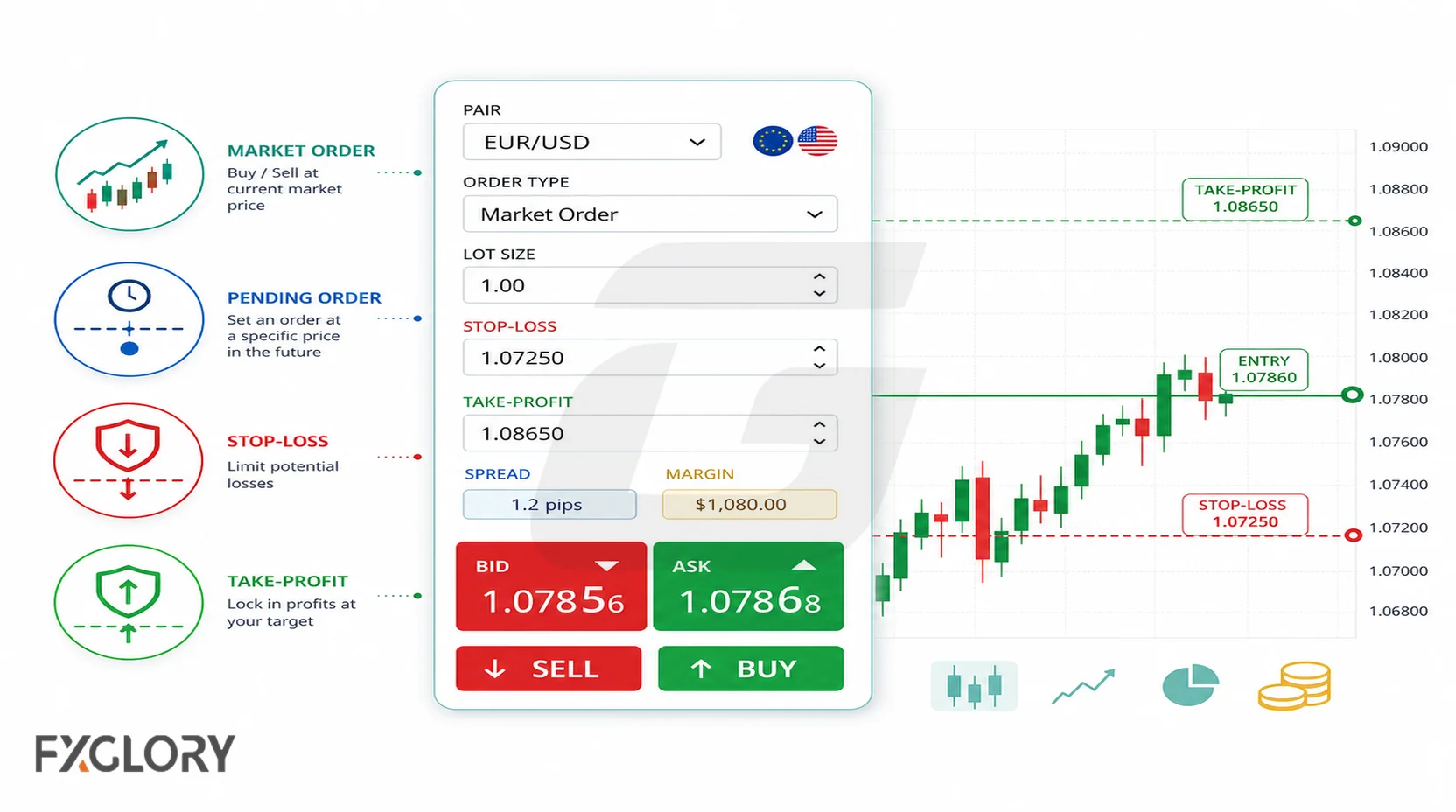
| Trade Ticket Field | Beginner Meaning |
|---|---|
| Pair | The currency pair being traded, such as EUR/USD. |
| Price / quote | The displayed bid/ask or current available price used for the order. |
| Buy/Sell | The direction of the trade. |
| Order type | How the trade is opened, such as market, limit, or another available order type. |
| Lot size | The position size selected for the trade. |
| Stop loss | The planned exit if the trade idea is wrong. |
| Take profit | The planned exit if the trade idea works. |
| Spread | The difference between buy and sell prices. |
| Margin | The required funds to open or maintain the position. |
Pip value and displayed profit or loss may depend on lot size, account currency, pair, and platform settings.
Common order terms include:
- Market order: An order to enter at the current available market price, subject to execution conditions.
- Limit order: An order to enter at a specified price or better, if that price becomes available.
- Stop-loss order: An order or instruction designed to close a trade if price reaches the planned loss level.
- Take-profit order: An order or instruction designed to close a trade if price reaches the planned profit target.
Some platforms may also offer stop-entry orders, expiry settings, or time-in-force settings for pending orders. Order names, availability, and execution rules can vary by platform, so the trade ticket should be reviewed carefully before using live funds.
After the order is submitted
If the order conditions are met, the position may open. Check the actual entry price and verify that any planned stop-loss and take-profit instructions are attached correctly. From that point, manage the position according to the written rules rather than changing the plan in reaction to short-term price movement. Spread, slippage, and other execution conditions can affect the actual entry and result.
Step 4: Calculate Position Size, Risk and Reward Before the Trade
This is the step many beginners skip, but it is one of the most important. Before opening a forex trade, the trader should estimate how much could be lost if the trade reaches the stop loss.
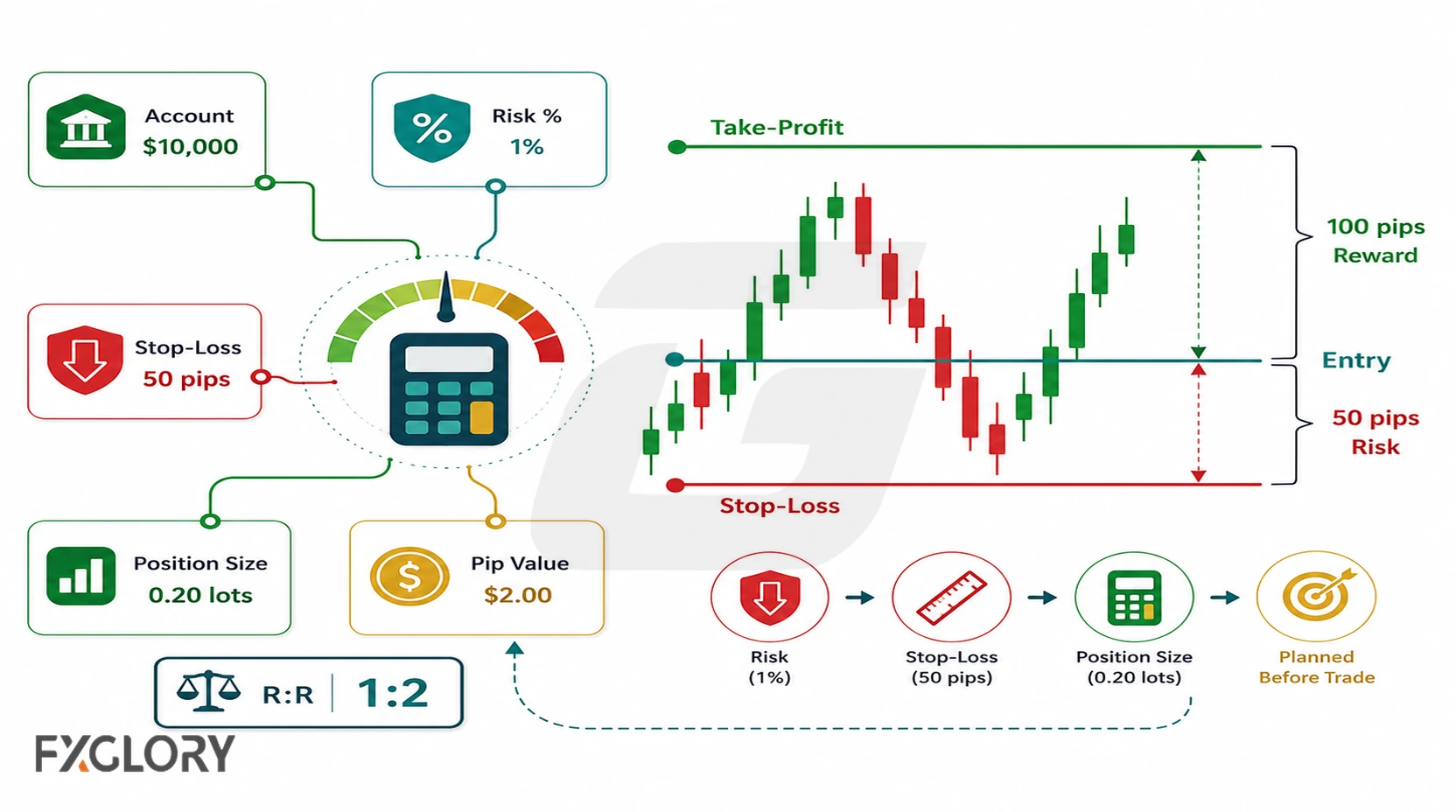
| Before Clicking Buy or Sell | Question to Answer |
|---|---|
| Pair | What am I trading? |
| Direction | Am I buying or selling, and why? |
| Entry | Where would the trade open? |
| Stop loss | Where is the trade idea wrong? |
| Take profit | Where is the planned target, and is it based on the setup? |
| Lot size | Does the position size fit the risk plan? |
| Spread | What is the trading cost from bid/ask difference? |
| Margin | What margin may be required? |
| Risk | What is the maximum planned loss? |
A simplified risk process looks like this:
- Choose the stop-loss distance: How many pips from entry to the invalidation level?
- Choose the money risk: How much can be lost if the trade is wrong?
- Estimate target pip value: Money risk divided by stop-loss pips.
- Choose lot size: Match lot size to pip value and risk limit.
- Compare risk and reward: Is the possible target reasonable compared with the planned loss?
- Check spread and margin: Make sure costs and required margin are understood.
For example, if the estimated pip value is $1 per pip and the stop loss is 30 pips away, the estimated price-movement risk is about $30 before costs. If that risk is too high for the plan, the lot size should be reduced or the trade should be skipped.
A trade plan should compare possible loss with possible target. For example, risking 30 pips to target 60 pips is a simplified 1:2 risk/reward idea before spread, slippage, swap, or other costs. Risk/reward is only a planning measure; it does not tell the probability of winning. The target should come from the setup, not be forced only to create an attractive ratio.
For more detail, see what is a pip in forex trading, what is lot size in forex, and what is leverage in forex trading.
Step 5: Practice on Demo, Review Results and Prepare Carefully for Live Trading
A demo account is a practice account that simulates trading with virtual funds. Demo trading can help beginners practice the steps without using real money. The goal is not only to see whether a trade wins or loses. The goal is to learn the platform, order ticket, quote display, position size, stop loss, take profit, and review process.
Success in demo does not guarantee live results. Demo practice is useful for learning the process, but live trading can feel different because real money, emotions, execution conditions, spread, and volatility can affect decisions.
| First Demo Trade Step | Action |
|---|---|
| 1 | Open a practice pair such as EUR/USD. |
| 2 | Read the quote and check the spread. |
| 3 | Choose a demo buy or sell direction. |
| 4 | Enter a practice lot size that matches the risk example being tested. |
| 5 | Add a stop loss. |
| 6 | Add a take profit. |
| 7 | Check spread, margin, and planned risk. |
| 8 | Place the demo order. |
| 9 | Record the result after closing. |
Before moving from demo to live
Beginners should not rush from demo to live trading just because a few demo trades worked. A stronger readiness check is whether the trader can repeat the process and follow risk rules. A beginner should be able to explain the trade before risking live funds.
- Can I read the quote correctly?
- Can I place orders without order-ticket mistakes?
- Can I calculate risk before entry?
- Do I follow stop-loss rules?
- Do I understand spread, slippage, lot size, and pip value?
- Have I reviewed demo trades?
- Do I have written rules?
Review broker, platform and account conditions
Check the broker’s account information and legal or regulatory details for your location. Rules, account availability, margin requirements, leverage, and protections can vary by country, account type, and instrument.
- Spreads, commissions if applicable, swaps, and possible slippage.
- Deposit, withdrawal, fee, and account-type terms.
- Minimum and maximum trade size.
- Margin rules, leverage, margin-call conditions, and stop-out rules.
- Risk disclosures and product availability for your location.
While the trade is open
While a trade is open, monitor whether the original plan is still valid. Do not move stops or targets without a written rule. If the setup changes, the plan should define whether to hold, adjust, or exit.
Review the trade after it closes
- Did I follow the plan? This measures discipline, not only trade outcome.
- Was risk calculated before entry? This checks position sizing and preparation.
- Did I move the stop? This reveals emotional trading or rule-breaking.
- Did spread or slippage affect the result? This helps the trader understand execution impact.
- What will I change next time? This creates an improvement loop.
Example: How a Beginner Forex Trade Works
This simplified demo example shows the trade process from idea to review. It is educational only, not a recommendation and not a trade signal.
Before building the example, a beginner could use the EUR/USD live price page to practice identifying the displayed quote, chart direction, buy/sell values, spread, and trade conditions.
| Trade Step | Example | Beginner Meaning |
|---|---|---|
| Pair | EUR/USD | Euro compared with US dollar. |
| Idea | Trader expects EUR to strengthen against USD. | The idea points to buying EUR/USD. |
| Action | Buy EUR/USD | Buy EUR and sell USD; check the ask/buy price and spread before entry. |
| Entry | Example quote near 1.1000 | The trade is planned around this price area. |
| Stop loss | 30 pips away | The level where the idea is considered wrong. |
| Take profit | 60 pips away | The planned target if the idea works. |
| Estimated pip value | $0.50 per pip | Comes from chosen lot size, pair, account currency, and platform settings. |
| Estimated risk | $0.50 × 30 pips = about $15 | Estimated price-movement risk before costs. |
| Estimated reward | $0.50 × 60 pips = about $30 | Estimated target before costs. |
| Risk/reward | Risk about $15 to target about $30 | Simplified 1:2 idea before costs. |
If price reaches the stop loss, the trade may close for the planned estimated loss before costs. If price reaches the take-profit level, the trade may close for the planned estimated gain before costs. If the setup changes before either level is reached, the plan may allow a manual exit and review. Spread, slippage, and execution conditions may make the actual result different from the simplified estimate.
Many beginner trade ideas will not meet the checklist. Skipping the trade is also a valid outcome when the setup, risk, spread, margin, or plan does not fit.
Common Beginner Mistakes When Trading Forex
Many beginner mistakes come from rushing into live trading before understanding the process. Watch for these problems:
- Risking too much on one trade: One losing trade can damage the account or trading confidence.
- Trading without a stop-loss plan: The trader does not know where the idea is wrong.
- Using leverage without a risk plan: High leverage can make oversized positions easier to open.
- Choosing lot size from desired profit: Lot size should be based on risk, not only on hoped-for gain.
- Moving the stop loss after entry: Changing the stop to avoid a planned loss can increase damage.
- Revenge trading or overtrading: Taking extra trades to recover losses or because of impulse can lead to poor decisions.
- Ignoring the spread: Spread can affect entry, exit, and short-term results.
- Trading around major news without understanding volatility: News events can increase movement, spread, and slippage.
- Trading without understanding the quote: The trader does not know which currency is being bought or sold.
- Not reviewing trades: The same mistakes repeat because they are not recorded.
Quick Recap: What Matters Before You Place a Forex Trade
The mechanics of submitting a forex order are straightforward; the important work happens before the click. The trade should have a clear reason, a defined invalidation point, a position size tied to planned risk, and an exit approach that can be explained in advance.
If you need to revisit the underlying terminology before practicing the order process, start with forex basics for beginners.